Building large, responsive email lists is much more science than art. And just as importantly, a well-documented list (with demographics and metric data available on each name or grouping of names) can be worth a great deal of money to publishers, advertisers, and brand management/ marketing groups as well as to your own business enterprises.
I've re-published, in its frightening totality and enormity [with pictures, charts, graphs and everything!], one of the best articles which I have seen in a long time published by

What would you rather have, a big list with dismal
conversion rates or a smaller list targeting a highly engaged audience?
Thought so.
For a healthy
opt-in email list, quality always
trumps quantity, and here are 19 budget-friendly ways to get the list
you want. What you'll find here are a few new twists to familiar
tactics, along with real results and examples, to help you implement
these ideas more effectively yourself.
1. Clarify your unique value proposition (UVP)
Who
could possibly be excited about signing up for more email? To turn
visitors into subscribers, you must show them what sets you apart from
the crowd. Use your value proposition to answer visitors' "What's in it
for me?" question—namely, getting something they value, something they
can't get anywhere else. (See more on
creating stronger UVPs, including a free PDF worksheet.)
 2. Start a swipe file
See ideas you want to
steal draw inspiration from? Combine the bookmarks, downloads, emails,
and screen captures that you're intrigued by into a digital swipe file.
Use it to get your creative juices flowing before brainstorming a new
campaign or test. Try a free Web- and mobile-based utility like
Evernote
for storing ideas on the go.
3. Listen to your readers
Long
surveys can be a drag, so try shorter, more focused formats. Add a
quick question to your welcome email, asking readers to share what's
keeping them up at night. Or with webinars, take full advantage of the
questions field for pre-event questions, poll the audience during the
webinar, and send out brief post-event feedback surveys. All those
tactics can yield feedback gold.
4. Test, test, test—with a calendar
Like
eating eight servings of vegetables a day, we know we should be testing
regularly, but it's tough to maintain the routine. Here's a trick: Add
testing to your content production calendar so it's rolled into the
process earlier. Add dates for analysis and review to close the loop,
too.
And while you're at it, have a carrot.
5. Measure engagement, not just opens and clicks
If
you want a clearer snapshot of your audience engagement rate, combine
your
key performance indicators—opens, clicks, conversions, bounces,
unsubscribes, pages visited, etc.—with a weighted ranking system to
create an "Engagement Scorecard" like this one from David Daniels. (See
this
great example.)
 6. Pitch your list in videos
Using
annotations in
YouTube videos is a well-known tactic for promoting
email sign-ups. But have you tried encouraging sign-ups in your video,
with a real, live, human-delivered call to action? Tim Carter of
AsktheBuilder.com did—and he got 38% more sign-ups than he did with his
annotated videos. (Read the
case study.)
 7. Test a lightbox form (1/3)
Many
marketers find
lightboxes annoying and are reluctant to test them on
their sites.
Michael Stelzner is not among them. According to him, the
lightbox form accounts for 70% of SocialMediaExaminer.com's list, which
grew 234% in one year, thanks in large part to this tactic. (See the
case study.)

 8. Test a lightbox form (2/3)
When
we tested a lightbox with the
AWeber blog, we saw similar results, with
a 64.7% gain in average weekly sign-ups. We also tested timing and
found the 45-second delay to be the sweet spot—it's not as off-putting
as a pop-up that's triggered immediately upon visiting a site.

 9. Did we mention testing a lightbox? (3/3)
Still
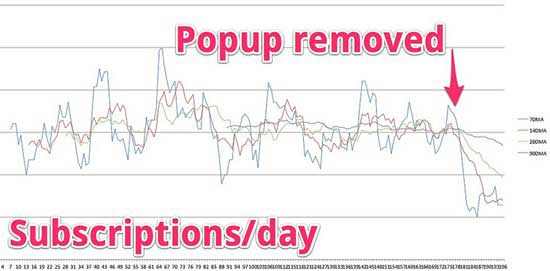
not convinced, eh? How about this: When Christopher Penn removed his
pop-up form, his daily email sign-up numbers "fell off a cliff" (see
chart). So, if you're not testing this method yet, think of all the
potential subscribers you could be missing out on right now. (
Read more.)
 9. Put opt-in forms around your best content
A
lot of marketers think one email opt-in form is enough, two on the same
page might be pushing it, and three or more is overkill. Derek Halpern
disagrees. To complement the header and sidebar opt-in forms on his blog
site, SocialTriggers.com, he added another form to the end of each blog
post and to the site footer. Results: In five months, he tripled the
site's list.
 11. Offer a free e-book to drive sign-ups
First,
make sure your e-book is relevant and high-quality; it should also have
a UVP of its own (see No. 1). Share it with a trusted circle, get frank
feedback on it (and blurbs for the cover), and tighten it up. Then at
launch, ask your circle of reviewers to share it with their circles for
more visibility. Bob Serling says his e-book of brief interviews with
business leaders (pictured) has produced 5,000 new subscribers a year
since it launched. (
Read more.)
 12. Host (or cohost) free webinars
Yes,
everybody's doing webinars these days. That's because webinars grow
lists if they're well executed and promoted. Cohosting webinars is a
tactic Danny Iny of Firepole Marketing used to grow his email audience
by 200% so far in 2012. Be clear in your requests to use registrants'
email, and consider using our next tip in conjunction with these events.
13. Create an autoresponder series
With
an automated series of emails, you can run countless tests, from drip
and lead-nurturing campaigns to a training series. Think about where
this tactic might help your pipeline the most. Try creating a short
series—3-7 emails long—as a follow-up for webinar registrants (consider
two separate series, one for attendees and one no-shows) or for people
who downloaded a certain product.
 14. Test a "Free Updates" call to action
Remember
the "Free Updates" tab that was in vogue years ago but fell out of
fashion? Well, we all know fashion is cyclical, and this tab might be
ready for a comeback. On SocialTriggers.com, the tab (pictured) gets
only 2% of site traffic, but with a 20% conversion rate, it's pulling in
an average of 1,000 new subscribers per quarter.
 15. Play up your social proof
If
"90,000 smart people" are reading a particular email (see picture),
wouldn't you want to join them? You're smart too, right? Of course—and
that's social proof in action. Social proof can come in many flavors: A
high number of subscribers, fans, or followers. A quote from a prominent
expert or celebrity. A review from a noteworthy publication. So if
you've got it, flaunt it—right above or below your email sign-up form,
if at all possible.
 16. Aim higher with guest blogging
A
smart tip from Jeff Ente, author of the WhosBloggingWhat.com weekly
email round-up: When you're searching for guest-blogging opportunities,
look for blogs that feature contributors' bio and site or social profile
links above the post, not just at the end. Getting this info above the
fold can result in an extra boost to traffic and new subscribers.
 17. Now and then, "go rogue"
We're
all desensitized to the steady stream of marketing content. Take a page
from MarketingProfs' own "Don Draper" email campaign for the
MarketingProfs B2B Forum (pictured), and try some radical changes with
tone, angle, design, or all of the above. It can really grab
attention—as this campaign did, with 30% higher open rates and more
social buzz than the rest of the series.
 18. Segment your lists
If
you're not segmenting your lists, do it already. Here's a test idea:
Segment your lists by activity level—e.g., actives (opens/clicks within
three months) vs. inactives (no opens/no clicks in the same period)—and
test a re-engagement series with inactives. Use a discount or incentive,
ask them what they expected at sign-up that they aren't getting, and
use those answers to rekindle relationships.
 19. Don't leave new subscribers hanging
Too
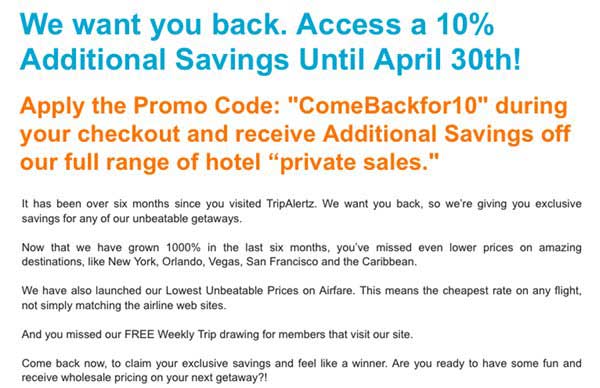
many email opt-in confirmation pages lead to a dead-end. Do more with
that page, whether it's asking for additional info or feedback (see
picture and No. 3), presenting bonuses (No. 11) or other subscription
options, or simply redirecting site visitors to your blog or social
feeds. Bonus: Send them the most recent issue of your email if there's a
long lag time between sends, and sample issues aren't prominent on your
site.

It was, admittedly a wonderful article. One of the first questions which you may be asking yourself, after you've completed your reading of the above 'bible' (in my opinion) of email list-building "
I would add a few items to the foregoing 19 (or 18...but who's counting?) in terms of building a great, responsive email list.
) Always have a catchy subject line on your emails - you've got to stand out in the inbox.
) Always include valuable information of use to virtually any reader. If you're going to advertise or promote, put that advertorial portion in the middle of the email.
) Address you recipients each personally by name, and have that name in the beginning of the email.
) Be certain that your emails contain sharing tool buttons at the end of the letter -- make it easy for each email recipient to forward the email to friends, or to share the email with his or her social media networks.
If you need some good content sharing tools, just conduct a google search for social+media+sharing+buttons. You'll get a terrific variety. Just try to avoid the toolbars.
) Offer a free report or other premium (you might do this on a form embedded into your site, or on a very brief pop-up, which gives the viewer a chance to check "yes" and then to be directed to a list-joining form.
) Here's a bit of code which you place anywhere you'd like to put a retweet button on your website, blog or newsletter -- it just requires that you copy this bit of code (have your blog on the HTML setting) and place it wherever you'd like for it to appear:
You can use Twitter to build your email lists -- but that's a subject for another post.


 November 6, 2012